This is default featured slide 1 title

Go to Blogger edit html and find these sentences.Now replace these sentences with your own descriptions.This theme is Bloggerized by Lasantha Bandara - Premiumbloggertemplates.com.

This is default featured slide 2 title

Go to Blogger edit html and find these sentences.Now replace these sentences with your own descriptions.This theme is Bloggerized by Lasantha Bandara - Premiumbloggertemplates.com.

This is default featured slide 3 title

Go to Blogger edit html and find these sentences.Now replace these sentences with your own descriptions.This theme is Bloggerized by Lasantha Bandara - Premiumbloggertemplates.com.

This is default featured slide 4 title

Go to Blogger edit html and find these sentences.Now replace these sentences with your own descriptions.This theme is Bloggerized by Lasantha Bandara - Premiumbloggertemplates.com.

This is default featured slide 5 title

Go to Blogger edit html and find these sentences.Now replace these sentences with your own descriptions.This theme is Bloggerized by Lasantha Bandara - Premiumbloggertemplates.com.

Showing posts with label Blogger. Show all posts

Saturday, 16 June 2012

Slidesnap Photography Blogger Templates With Slider

Slidesnap


From 2 day I was not publishing any post because I was busy in making this awesome blogger templates.Deepak Kamat Css expert and Author of our blog help lot to design whole body.He insert lot of dynamics features in this template.

World First Free Template With Manual Slider- Many Big photography blog like damnlol.com having good looking slider by which user can easily slide to next post without going to home.I find this type on Google but no template I find with manual slider. That's y We created this template.It is not easy task to create this manual slider it is hard work of our author Deepak Kamat .

How we create Manual Slider- With Css and Html we replace older and never link with this slider.First we make it float on left and right side of blog than we added style and hover effect on it,But which it looks awesome.


Features-


  1. 2 Coloum
  2. Right Sidebar
  3. Daynamic Navigation Menu
  4. Daynamic Popular post widget
  5. Dynamic Header
  6. Header With Hiding hover Effect.
  7. Meta Tags Added
  8. Navbar Removed
  9. Dynamic Post Title
  10. Css Manual Slider
  11. Subscribe Gadget With Css Hover Effect
  12. Latest Jqurey plug-in Added
  13. Hover Effect Labels
  14. Neat And Clean
  15. Seo Friendly


Download


This is hard work of our we will not give this template easily.This template is 100% free but you need to do little work by which you will get this template.Follow Below Steps To Get This Template

Step 1- Just Subscribe Us Via Email

Enter your email Address And Subscribe To Get This Template


Step 2- Comment Your Email Address Below We Will Send You This Template Via Email 


Screenshot-


Dynamic Header
header


Dynamic Post Title With Hover Effect
heading


Mouse Hover Effect
mouse over


Labels
labels


Css3 Navigation With Hover Effect

page navigation


Manual Slider
manual


Subscribe
subscribe


Protected


DMCA Protected You Can Redistribute or remove or edit this template.This template is only for using not for distributing.You are also not having any right to remove or change attribution Below Template.


Wednesday, 13 June 2012

Reason Shows That You Are Still a Beginner in Blogging


Blogger

I saw many blogger and many of them are good and some of them are still beginners but whenever i give them advice they say "Shut Up I am better than You" So I write this post to show you how I judge them as beginner bloggers.

Blogging is not a game you need to make your blog as perfect as you can.

Practice does not make perfect. Only perfect practice makes perfect.


Checking Blog Status Everytime


If you are checking your blog status every-time then this shows you are beginner,Just don't write any content for getting traffic just write post for getting good response from others.As I always say you that content is king if your blog is containing good amount of content then you will get lot of traffic without any advertisement.


Changing Blog Template Every Week


I saw many blogger changing there blogger template every time this is not good for seo and your blogger visitors.You should choose Unique template for your site and make your site template permanent.

If you want some good template see out template gallery


Starting Blog Post with hello,hi,hey....


Visitor don't visit your blog to do hello hii with you, facebook is there to do this all actvity you should come directly to main topic It will save your time and reader time too


Long Delays Between Updates


You are giving real-time updates when live blogging. You don�t have to do minute by minute updates, but don�t let more than five minutes pass between updates. You are guaranteed to lose your audience. And, you may get bored and distracted.

Tuesday, 12 June 2012

Scrolling Popular Post Gadget For Blogger


Blogger

Hey friends this is very good post I am sure you will love this post.In this post I will give you two method by which you can make your blog simple popular post widget into animated scrolling popular post widget.This both popular post widgets are very cool change automatically with nice css effect.This Widget is made by Abu Farhan and Mohammad Mustafa Ahmedzai.You should follow below steps carefully because many other blogger face problem while adding codes.If you don't know basic of adding codes then see this post (How to find code in blogger)


Scrolling Popular Post Widget Style 1


  1. Go To Blogger >>> Design
  2. Click add a gadget
  3. Choose Popular Posts Widget provided by blogger
  4. Keep post number greater than 4
  5. Save your widget
  6. Now select an HTML/Javascript widget
  7. Paste the following slide code inside it,


<style type="text/css" media="screen">
#PopularPosts1 {
overflow:hidden;
margin-top:5px;
width:100%;
padding:0px 0px;
height:310px;
}
#PopularPosts1 ul {
width:310px; 
overflow:hidden;
list-style-type: none;
padding: 0px 0px;
margin:10px 0px 0px 10px;
}
#PopularPosts1 li {
 width:290px; 
padding: 5px 5px;
margin:0px 0px 5px 0px;
list-style-type:none;
float:none;
height:80px;
overflow: hidden;
background:#fff url(https://blogger.googleusercontent.com/img/b/R29vZ2xl/AVvXsEjHlwLMb4IjMNNid1E2vj7BpGzeG8x44SOghfeypM1fiYGaFoXjsvlG5xNrJObwTd2h9avK_J38qMGKhHfKSMGBn6sJQe-nivocsNaKpyxJIyX6X_YP5YOommoxEzf932x8KGkNuunxY8U/s400/popular+posts.jpg) repeat-x;
border:1px solid #ddd;
}
#PopularPosts1 li .item-title {
 
    font-size:1em;
    margin-bottom:0.5em;
}
#PopularPosts1 li .item-title a {
text-decoration:none;
color:#7CA2C4;
font:bold 12px verdana; 

height:18px;
overflow:hidden;
margin:0px 0px;
padding:0px 0px 2px 0px;
}
#PopularPosts1 li img {
float:left;
margin-right:5px;
background:#EFEFEF;
border:2px solid #7CA2C4; 
}
#PopularPosts1 li .item-snippet {
  overflow:hidden;
font-family:Tahoma,Arial,verdana, sans-serif;
font-size:10px;
color:#289728;
padding:0px 0px;
margin:0px 0px;
}
#PopularPosts1 .item-snippet a,
#PopularPosts1 .item-snippet a:visited {
    color:#3E4548;
    text-decoration: none;
}
#PopularPosts1 .spyWrapper {
    height: 100%;
    overflow: hidden;
    position: relative;
}
#PopularPosts1 {
    -webkit-border-radius: 5px;
    -moz-border-radius: 5px;
}
.tags span,
.tags a {
    -webkit-border-radius: 8px;
    -moz-border-radius: 8px;
}
a img {
    border: 0;
}
-->
</style>
<script src="http://ajax.googleapis.com/ajax/libs/jquery/1.6.2/jquery.min.js" type="text/javascript"></script>
<script type="text/javascript" charset="utf-8">
$(function () {
    $('.popular-posts ul').simpleSpy();
});
</script>
<script src="http://accordion-for-blogger.googlecode.com/svn/trunk/simplespy.js" type="text/javascript"></script>


Keep the two widgets together. One on top of another as shown below,   

Keep Both Widget Together


Scrolling Popular Post Widget Style 2


  1. Go To Blogger >>> Design
  2. Click add a gadget
  3. Choose Popular Posts Widget provided by blogger
  4. Keep post number greater than 4
  5. Save your widget
  6. Now select an HTML/Javascript widget
  7. Paste the following slide code inside it,


<style type="text/css" media="screen">
#PopularPosts1 {
 overflow:hidden;
margin-top:5px;
padding:0px 0px;
height:400px;
}
#PopularPosts1 ul {
width:220px;
overflow:hidden;
list-style-type: none;
padding: 0px 0px;
margin:0px 0px;
}
#PopularPosts1 li {
 width:208px;
padding: 5px 5px;
margin:0px 0px 5px 0px;
list-style-type:none;
float:none;
height:80px;
overflow: hidden;
background:#fff url(http://i879.photobucket.com/albums/ab351/bloggerblogimage/blogger/post.jpg) repeat-x;
border:1px solid #ddd;
}
#PopularPosts1 li .item-title {
    color:#A5A9AB;
    font-size:1em;
    margin-bottom:0.5em;
}
#PopularPosts1 li .item-title a {
 text-decoration:none;
color:#4B545B;
font-size:11px;
height:18px;
overflow:hidden;
margin:0px 0px;
padding:0px 0px 2px 0px;
}
#PopularPosts1 li img {
 float:left;
margin-right:5px;
background:#EFEFEF;
border:0;
}
#PopularPosts1 li .item-snippet {
  overflow:hidden;
font-family:Tahoma,Arial,verdana, sans-serif;
font-size:10px;
color:#262B2F;
padding:0px 0px;
margin:0px 0px;
}
#PopularPosts1 .item-snippet a,
#PopularPosts1 .item-snippet a:visited {
    color:#3E4548;
    text-decoration: none;
}
#PopularPosts1 .spyWrapper {
    height: 100%;
    overflow: hidden;
    position: relative;
}
#PopularPosts1 {
-webkit-border-radius: 5px;
-moz-border-radius: 5px;
}
.tags span,
.tags a {
-webkit-border-radius: 8px;
-moz-border-radius: 8px;
}
a img {
    border: 0;
}
-->
</style>
<script src="http://ajax.googleapis.com/ajax/libs/jquery/1.6.2/jquery.min.js" type="text/javascript"></script>
<script type="text/javascript" charset="utf-8">
$(function () {
    $('.popular-posts ul').simpleSpy();
});
</script>
<script src="http://accordion-for-blogger.googlecode.com/svn/trunk/simplespy.js" type="text/javascript"></script>


Keep the two widgets together. One on top of another as shown below,   


Comment If You Like This Post

Saturday, 9 June 2012

Peel effect Rss Subscription Widget For Blogger

You may see this peel effect to many other blogs,I just edited it and add feed burner icon + link inside it.

How it work?

After installing this widget to your blog,it will start appearing top right corner of your blog,when some one mouse over it the peel effect will start and subscription icon will shows.

In this Post i will teach You how to add this peel effect Rss Subscription widget to blogger.


Live Demo


Follow Below Steps to add this widget to your blog.


Step 1


Add jQuery plugin (if your blog have a jquery plugin,ignore this step)

  • Go to blogger dashboard.
  • Click on Template>>>Edit Html.
  • Now search </head>
  • Copy And paste below Code Above </head> code.

<script src='http://ajax.googleapis.com/ajax/libs/jquery/1.7.1/jquery.min.js' type='text/javascript'/>


Steps 2


  • Go to blogger Dashboard.
  • Click on Template>>>Edit Html.
  • Now search </head>
  • Copy And paste below Code Above </head> code.

<style type='text/css'>img { behavior: url(iepngfix.htc) }#pageflip {position: absolute;right: 0; top: 0;float: right;}#pageflip img {width: 50px; height: 52px;z-index: 99;position: absolute;right: 0; top: 0;-ms-interpolation-mode: bicubic;}#pageflip .back-img {width: 50px; height: 50px;overflow: hidden;position: absolute;right: 0; top: 0;z-index:98;background: url(https://blogger.googleusercontent.com/img/b/R29vZ2xl/AVvXsEglK3DCr6wcq0M27ckQSw-EyUjc84U_Nc2Sud6dkQWYBwfbkS5-LzUTgMd4Jwtz9O2WHr2UdUeI6kMUMIQUtu1A-EbXXg0ciHaPF1cDpMQP-a2WkVOFUW3JYZ_7mG2OiwxcscjHyon3TbA/s200/rss+netoops+blog+page+peel.png) no-repeat right top #fff;}</style><a href='http://netoopsblog.blogspot.com'><img src='https://blogger.googleusercontent.com/img/b/R29vZ2xl/AVvXsEiOh_xs3W8wjCNiStJ0r7wsF1CEr4-CYgkT_hY-tOkhxae1bEl-P8tMiqBDABG08zsuSPyHbjBxLmVOV9ySkQqrewcZI92DwqoIhApxxLUuifdF-v3WaxWkZYlfxq47Cu_yPyIbmK76Mac/s1600/1x1juice.png'/></a><script type='text/javascript'>$(document).ready(function(){//Page Flip on hover$(&quot;#pageflip&quot;).hover(function() {$(&quot;#pageflip img , .back-img&quot;).stop().animate({width: &#39;307px&#39;,height: &#39;319px&#39;}, 500);} , function() {$(&quot;#pageflip img&quot;).stop().animate({width: &#39;50px&#39;,height: &#39;52px&#39;}, 220);$(&quot;.back-img&quot;).stop().animate({width: &#39;50px&#39;,height: &#39;50px&#39;}, 200);});});</script>

Step 3


  • Go To Blogger Dashboard.
  • Click on Template>>>Edit Html.
  • Now Search </body>
  • Copy And paste below Code Above </body> code.

<div id='pageflip'><a href=' http://feeds.feedburner.com/lordhtml '><img alt='netoops blog' src='https://blogger.googleusercontent.com/img/b/R29vZ2xl/AVvXsEjxJdGMDPdhrHQfLRy1_umuFigqcOyUbGRFM4U2sr2Ezbw8rGTBKeXwE7BuAP6VDC8Y8BwqDywSlQLtykD3mJABZsa61nhcpbUm_XufQBUNyRuBb99g-aXmIIxhP3bvOY47aL7NQIh3Rbr5/s1600/page_flip.png'/></a><div class='back-img'/></div>

Now save Template.


You're Done!!! If Any Problem Feel Free To Comment

Friday, 8 June 2012

Tech Bloggers, what you will use ? WordPress or Blogger ?

WordPress or Blogger
The most popular activity on the internet is Blogging, Millions of people write about their daily life just like a personal diary that's public or make web journal, travel blogs, cooking blog they are the most popular categories of blogging. Other side of the Blogging world is Tech blogs, most people even with a little knowledge of technical stuff start a Tech blog. But they stuck with a question that what should they use to blog ?
People who blogs only for a personal diary, journal or travel blog etc. would choose any Blogging platform they would only think about the CMS when they are little experienced with the platform they are using, that's good. But for so called newbie tech bloggers, they just worry about their CMS, most of them don't even think about the content.

We are describing the usability of a CMS by various levels of blogger. We will also tell you the advantages of using Blogger other than using any CMS out in the industry.

Blogger - One of the oldest and best Blogging platform, trusted by Millions. Even we use Blogger as a content managing system (CMS), Blogger have a interesting history. It was first developed by a small team of Pyra Labs, after a great success period, Blogger came into eyes of Google and it's when Google acquired it and make it better than ever.

WordPress - Another blogging platform used by Millions, but not by everyone who start blogging recently, people won't just get into it to learn the basics of Blogging, from Labnol to ShoutmeLoud most of the popular blogs use this as their medium of Blogging, but i will state the dark side of it to you in the next section.


Disadvantages of WordPress


If you are new to Blogging then it's useless to go for WordPress, it does provide features similar to blogger but you have to pay for your hosting services, which is a nightmare to new Blogging Techies. Think what you just signed up at WordPress to start a new blog and you see that you have to host your files at a file hosting service to start up your blog and design it. It's next to impossible to add functionality to your WordPress blog without hosting your files and the next problem is that limited bandwidth you get from your hosting services and it's not too important because less established bloggers start blog to earn money and they just want to increase their expenses by using a hosting service.


What's good with Blogger


What's good in Blogger ? Everything !. Blogger is undoubtedly a great platform for new bloggers, the majority of cook blog, travel blog and personal blog is more than that of tech, where tech savvy person likes to use WordPress as they can save for the hosting service bills  
bloggers who are new love to use Blogger, even Labnol was on Blogger at first but as it started earning good money it shifted on WordPress, you can still see labnol at the Blogspot address @ http://labnol.blogspot.com . 9Lesson the most famous blog for programming is also on Blogger, think why wouldn't Srinivas Tamada choosed WordPress ? Just to avoid complication and limited bandwidth.

The ultimate CDN of Google will never let your Blogger blog be down and you never need to worry about the bandwidths, all you have to work on is your Template design and Content, which is the most important element of a blog, Blogger gives you full accessibility to add or remove gadgets, features and functions from your Blog.

You can just calculate the majority of Blogger user by searching a term online and seeing what amount of result do you get is from Blogspot blogs compared to WordPress blogs, i rarely see any WordPress blogs when i search for something.

People are satisfied with what Blogger and Google provide us, from email to Blogger platform they are the best and we can't even imagine the internet without Google.


Disclaimer


Okay, writing this article doesn't mean that we are forcing you to stay on or use Blogger or WordPress, we have just presented our thoughts for WordPress and Blogger, the article is neutral and doesn't reflect any disability of any of the mentioned service.  


Article written by


Deepak Kamat, is a blogger and web designer, usually writes about new Web Design techniques and fixes for Blogger. He is a student and loves writing, but mostly articles and CSS. You can visit him  his blog http://stramaxon.blogspot.com


Monday, 28 May 2012

How To Find Code In Your Blogger Template

Many bloggers still don't know how to find code in there blogger template it is very easy we can find any code in just 3 second, ya its true .So in this tutorial I will teach you how to find code in your blogger template.

follow below steps it will help you -


  • Go to blogger dashboard.
  • Now click on template tab.
  • Now click on Edit HTML button.

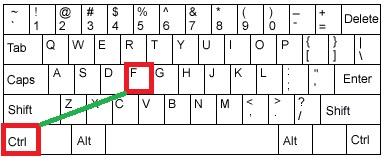
  • Now press Ctrl + F button

  • Now one search bar will come out.
  • Enter the code which you want to search. (I am searching </head>)
  • And code will appear in front of you.


If you are having any problem related with this post then comment below....:)

Saturday, 26 May 2012

How to create contact us page for blogger

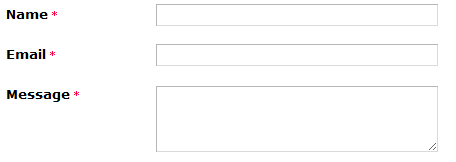
You see Lord Html Contact page If you want to create that type of contact page for your blog then today in this post i will give you step by step guide,So lets start

For making Contact Page You Need To Host Your Contact Form,So You need to choose a site where you can host your contact form in free.

There are several Free Form Making Sites-

  1. Wufoo
  2. JotForm
  3. 123contactform
We will make our form on 123ContactForm because it easily integrate with blogger.So follow below steps to make contact form.

  • Sign Up to 123Contactform.
  • After you will redirected to Dashboard.
  • Now click of create new form.
  • Now Select Contact Form.
  • Make Form According To Your Style.

  • After Designing form click on Continue button.


Now Click On Publish Button And Your Contact Form Will Start Appearing on Your Blog


Whenever any visitor will submit the form you will get email notification.


Friday, 25 May 2012

Tips to Start Blogging Successfully

Whatever you topic you want to blog, but you have to keep many things in mind when you are Blogging, these tips will help you prevent the mistakes that most Bloggers are unaware of. Yup, there are thousands of topic for you to blog on like internet, tech, kitchen, housekeeping, babies and so one, but you have to be perfect to achieve what you want. To make blogging more fun and also to make your blog more fun to read you have to keep these in minds when blogging.


Online Presence


Existing online and living online is two different things, readers wants you online, we know that not everyone can put their whole day in their blog, but whenever you get time, respond to your readers and also become members on blogs with similar topics, the more you interact with others the more popularity you gain.

Don�t start Blogging just for money


Who don�t want money, but many Bloggers start blogging with a aim of earning money online and that�s the worst decision a blogger make, because you can�t make good money till you do some hardwork, you get paid for what you deserve, so write helpful and interesting post that people will love reading and leave everything on your readers. Wait for some months as every ad programme have huge list of TOS for you to participate, Adsense the highest paying ad network only allows Websites older than 6 months in their programme. Don�t lose hope if you get disapproved from AdSense, as much as you write on your blog, you will have more chances of earning.

Maintain your post quality


Again, this is very important the post quality, whatever you post, it should reflect the exact point always be clear as much as you can,don�t stretch a sentence to paragraphs just to show that you wrote too much, visitors love to read little posts, so whenever you write remember that readers would prefer reading small articles.

Guest Posting


For any new blogger it�s very important to guest post on other successful blogs, share you expertise as more and more readers will see your post and that will create a good reputation for you, always remember to give a link for readers to your blog so that they can know more about you and your blog. Finding big blogs with similar interest is not too hard, just check Pinterest and also search Google.

Content is king


Every blogger should know �Content is king� which is true and important for every blogger, if you have unique content online then it�s sure to have good numbers of readers on your blog, always write posts yourself, i mean don�t copy from other�s blog or website that will decrease your site�s reputation and what can be worst than that.

Social Networks


Social networks are not compulsory to become a successful Blogger, but if you want more readers than you should interact with peoples with similar interest on social networks, currently Facebook is the biggest social network site but Google+ is the best.

Which blogging platform ?


Are you confused between WordPress or Blogger, no don�t ever get confused with this, use what you feel you are comfortable with, as no one have minus or extra points to choose a blogging platform, both will require you to hardwork on your blog to make your blog successful.But always remember to index your pages on Google Webmaster tools for Google search engines to index your page more efficiently.how to bloghow to make a blogmake money blogmake money bloggingmake money onlinemaking money onlinehow to make moneymake money on the internetAlways keep these things in mind, and one day you will see yourself as the rising star, the more time you give to blogging the more you will be popular. Also remember to follow tips from more successful bloggers such as John Chow, Darren Rowse, Amit Agarwal etc.


Published By


Hey Its My First Guest Post in this blog I hope you will like this If I will get good response from this post then I will create more post.

My BLOG- http://goo.gl/EJyKI

About Me-My name is Elvis Shrestha


Copyright protected


You can read real post at http://goo.gl/EJyKI ,this post is mirror of that post.That post is also written by me and this post is also written by me.So its not come Under Copyright Act.

DMCA.com

Thursday, 24 May 2012

Grow Horizontal Menu With hover Effect


I already give you color navigation menu for blogger that was awesome now i wil give you growing menu,When the mouse hover on the menu, it will increase the height and width of menu, making as stylish and attractive.


This menu is made with the help of-

  • Css
  • Html
  • JavaScript 

But I converted all code in single code by which it will become easy for you to install it.


Adding Navigation Menu


To Add This Menu To Blogger Just Copy The Following code And Paste it in HTML/JAVASCRIPT .


<ul class="hor-nav">
<li><a href="#### ">Home</a></li>
<li><a href="#### ">Contact Us</a></li>
<li><a href="#### ">About Us</a></li>
<li><a href="#### ">Advertise</a></li>
<li><a href="####">Blog</a></li>
<li><a href="####">Privacy</a></li>
</ul>

<style>
.hor-nav li {
list-style: none; float:center;}
.hor-nav li {
float: left;
padding-top:10px; padding-bottom:20px;}
.hor-nav li a {
font-family: 'Righteous', cursive;
font-size:17px;
text-decoration:none;
float:center;
position: relative;
display: block;
padding: 14px 25px;
border-bottom: 8px solid #ccc;
background: #f4f4f4; color: #999;
-webkit-transition: all 200ms ease-out;
-moz-transition: all 200ms ease-out;
-o-transition: all 200ms ease-out;
transition: all 200ms ease-out; }
.hor-nav li a:hover {
text-decoration:none;
color: #000; background: #fff;
border-color: #000;
padding: 25px; top: -14px; }
.hor-nav li .active a, .nav li .active a:hover {
background: #444; color: #fff;
border-color: #000; }
</style>
<script type="text/javascript">
  WebFontConfig = {
    google: { families: [ 'Righteous::latin' ] }
  };
  (function() {
    var wf = document.createElement('script');
    wf.src = ('https:' == document.location.protocol ? 'https' : 'http') +
      '://ajax.googleapis.com/ajax/libs/webfont/1/webfont.js';
    wf.type = 'text/javascript';
    wf.async = 'true';
    var s = document.getElementsByTagName('script')[0];
    s.parentNode.insertBefore(wf, s);
  })();
</script>

Customization


In the HTML section, just replace the #### with your page link..

Wednesday, 23 May 2012

Make Your Site Greener

save_energy

Make Website Green,Now a days we are wasting so much energy so If you want to help nature then just Place One Line Code in Your Site.

How its Work


The standby engine is a project developed to reduce power consumption, when generating and displaying a website, without changing user experience while using the website. This is done by covering the site in a stationary, black color, which hides visual effects making the visitor's computer use less energy generating and displaying these.

Add This To Your Blog


Copy the Following Code And Paste it Above </head> tag on your website... yeah, it's that simple!

<script language="javascript" type="text/javascript" src="http://www.onlineleaf.com/savetheenvironment.js"></script>

For Blogger 


  • Go to blogger dashboard.
  • Click on Template tab.
  • Now Click on Edit HTML button.
  • Now Find (ctrl + f) <head> tag
  • Paste Below Code Below It And Save Template.
<script language="javascript" type="text/javascript" src="http://www.onlineleaf.com/savetheenvironment.js"></script>

How To Add CSS Box Shadow To Images

If your Images are having box shadow then it will look great, In my opinion box shadow makes images quality better (high definition)  If you want to add box shadow to your blog or website follow below steps-

Box shadows are divided in three part-


  • Outer
  • Inner
  • One Sided
To Add Box Shadow To Website Copy The Following Css Code And Paste It in Your Website Css Code.

If you want to add it in blogger then you need to paste it above ]]></b:skin> 


Outer


.post-body img {
  -moz-box-shadow:    3px 3px 5px 6px #ccc;
  -webkit-box-shadow: 3px 3px 5px 6px #ccc;
  box-shadow:         3px 3px 5px 6px #ccc;
}


Inner


.post-body img {
  -moz-box-shadow:    inset 0 0 10px #000000;
   -webkit-box-shadow: inset 0 0 10px #000000;
   box-shadow:         inset 0 0 10px #000000;
}


One Sided


.post-body img {
 -webkit-box-shadow: 0 8px 6px -6px black;
  -moz-box-shadow: 0 8px 6px -6px black;
       box-shadow: 0 8px 6px -6px black;
}

Change Text Selection Color For Blogger

text

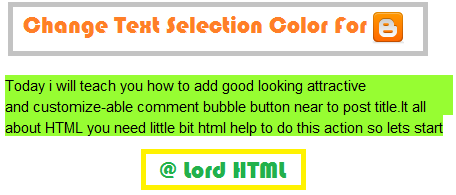
Hey friends Today i will teach you how to change Text Selection Color For Blogger it will make your blog look more wonderful and it is very simple to apply.

For doing this change you need to add CSS.

Browser Support-

  • Mozilla Firefox
  • Google Chrome
  • Apple Safari


Follow following steps to make this change


  • Go to blogger dashboard.
  • Click on template tab.
  • Now Click on Edit HTML Button.
  • Now Find (ctrl + f) ]]></b:skin>
  • Paste below code above ]]></b:skin>

/* Code By Lord Html */
::-moz-selection {
       background-color: #FFA;
       color: #000;
}
/* Code By Lord Html */
::selection {
       background-color: #FFA;
       color: #000;
}

Now Save Template 


Customize


If you want to change selection colors according to your style then you need to change hex color which I highlighted with red and orange, Red color is for selection and Orange Color is for Text.

For changing Hex color go To our Hex Chart Select Hex Color And Replace It.

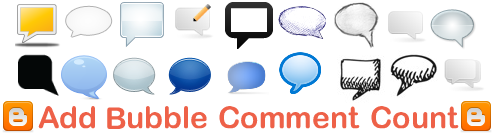
Add Bubble Comments Count in Blogger Post Title

bubble


Today i will teach you how to add good looking attractive and customize-able comment bubble button near to post title.It all about HTML you need little bit html help to do this action so lets start our mission

Follow Steps to add bubble comments count


  • Go to blogger dashboard.
  • Now click on tamplete tab.
  • Now click on Edit Html button.
  • Tick expand widget.
  • Search for (ctrl + f) ]]></b:skin>  .
  • Paste the below code above  ]]></b:skin> 
.comment-bubble {
float : right;
width : 48px;
height : 48px;
background : url(https://blogger.googleusercontent.com/img/b/R29vZ2xl/AVvXsEisMiW9EMU5wyAilvyYchhyQ429XPJddX0urGHbuxYNYNAE7Y2osaG4EDJl5mjafByjFM8CavERIZheJPYyX0YJUGy1QOZtWBeH-2pxUnil0j-_Zpt_DQyttCD-RHfl7uk-yCY_vHut7byS/s1600/Comment+Bubble+%2815%29.png) no-repeat;
font-size : 18px;
margin-top : -15px;
margin-right : 2px;
text-align : center;
position:absolute;
}   


  •  Now find  <b:if cond='data:post.link'> And paste below code above it.
<b:if cond='data:post.allowComments'><a class='comment-bubble' expr:href='data:post.addCommentUrl' expr:onclick='data:post.addCommentOnclick'><data:post.numComments/></a></b:if>


  • Now click on save template button and preview your blog.


Customize


To use this images [Right Click and "Copy Image Address/Location"]


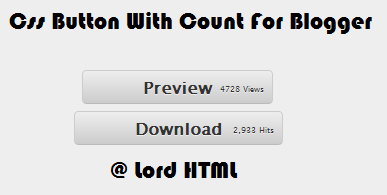
CSS Button With Count For Blogger

count_button.

Today I will teach you how to add this professional looking buttons to your blog.This button need php and css combination but know you will get problem to host php so I will only teach you Css section.

To Add this Button to blogger you need little knowledge of CSS And Html 
  • This button Css code will go to your blogger template and html code will placed where you want this button to display.

CSS


Paste the following Css code above ]]></b:skin> in your blog html code section.If you don't know how to paste Css then go to Template>Edit HTML>And there find (ctrl + f) ]]></b:skin>  and paste following code above it.

.gray-button {
background-color: #EEE;
background-image: -webkit-gradient(linear, left top, left bottom, from(#EEE), to(#CCC));
background-image: -webkit-linear-gradient(top, #EEE, #CCC);
background-image: -moz-linear-gradient(top, #EEE, #CCC);
background-image: -ms-linear-gradient(top, #EEE, #CCC);
background-image: -o-linear-gradient(top, #EEE, #CCC);
background-image: linear-gradient(top, #EEE, #CCC);
border: 1px solid #CCC;
border-bottom: 1px solid #BBB;
-webkit-border-radius: 4px;
-moz-border-radius: 4px;
-ms-border-radius: 4px;
-o-border-radius: 4px;
border-radius: 4px;
color: #333 !important;
font: bold 16px "Lucida Grande", "Lucida Sans Unicode", "Lucida Sans", Geneva, Verdana, sans-serif;
line-height: 1;
padding: 8px 60px;
text-align: center;
text-shadow: 0 1px 0 #EEE;
display: inline-block;
margin: 0 5px;
}
.gray-button:hover {
background-color: #dddddd;
background-image: -webkit-gradient(linear, left top, left bottom, from(#dddddd), to(#bbbbbb));
background-image: -webkit-linear-gradient(top, #dddddd, #bbbbbb);
background-image: -moz-linear-gradient(top, #dddddd, #bbbbbb);
background-image: -ms-linear-gradient(top, #dddddd, #bbbbbb);
background-image: -o-linear-gradient(top, #dddddd, #bbbbbb);
background-image: linear-gradient(top, #dddddd, #bbbbbb);
border: 1px solid #bbb;
border-bottom: 1px solid #999;
cursor: pointer;
text-shadow: 0 1px 0 #ddd;
text-decoration:none;
}
.gray-button:active {
border: 1px solid #aaa;
border-bottom: 1px solid #888;
-webkit-box-shadow: inset 0 0 5px 2px #aaaaaa, 0 1px 0 0 #eeeeee;
-moz-box-shadow: inset 0 0 5px 2px #aaaaaa, 0 1px 0 0 #eeeeee;
-ms-box-shadow: inset 0 0 5px 2px #aaaaaa, 0 1px 0 0 #eeeeee;
-o-box-shadow: inset 0 0 5px 2px #aaaaaa, 0 1px 0 0 #eeeeee;
box-shadow: inset 0 0 5px 2px #aaaaaa, 0 1px 0 0 #eeeeee;
}

HTML

Now Paste the html code where you want to display this button.

<a class='gray-button' href='#' target='_blank'>Your text Here </a>


Remark

Respect My work don't copy it or publish it without my permision,If you love our work then you are free to share and comment golden words below.If you are having any problem then you can ask by commenting below i will try to answer it.