This is default featured slide 1 title

Go to Blogger edit html and find these sentences.Now replace these sentences with your own descriptions.This theme is Bloggerized by Lasantha Bandara - Premiumbloggertemplates.com.

This is default featured slide 2 title

Go to Blogger edit html and find these sentences.Now replace these sentences with your own descriptions.This theme is Bloggerized by Lasantha Bandara - Premiumbloggertemplates.com.

This is default featured slide 3 title

Go to Blogger edit html and find these sentences.Now replace these sentences with your own descriptions.This theme is Bloggerized by Lasantha Bandara - Premiumbloggertemplates.com.

This is default featured slide 4 title

Go to Blogger edit html and find these sentences.Now replace these sentences with your own descriptions.This theme is Bloggerized by Lasantha Bandara - Premiumbloggertemplates.com.

This is default featured slide 5 title

Go to Blogger edit html and find these sentences.Now replace these sentences with your own descriptions.This theme is Bloggerized by Lasantha Bandara - Premiumbloggertemplates.com.

Showing posts with label tips. Show all posts

Thursday, 14 June 2012

How To Add Meta Tags For Each Post In Blogger

meta tags


Meta tag are very important for any blog in olden day's I was adding meta tags by posting code but now blogger made it easy for blogger to add meta tags.In this post i will teach you how to add meta tags to blog and also to each post in blogger.


Adding Meta Tags To Blog


  • Go to blogger Dashboard
  • Click On Settings Tab
  • Now Click On Search Preference
search

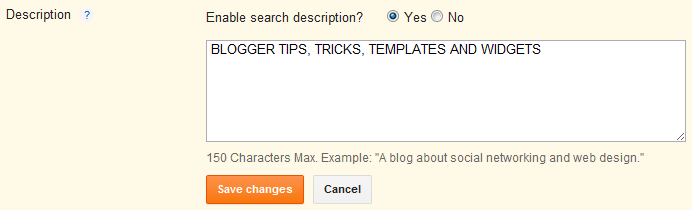
  • Now Enable search Description And Write your blog description there.

description


  • After Adding Description Save It.


Adding Meta Tags To Each Blog Post


After doing above steps whenever you will post any new post click on search description tab and add post description there and save it.If you are having any problem see below picture.


click on image to make it big


Wednesday, 13 June 2012

Reason Shows That You Are Still a Beginner in Blogging


Blogger

I saw many blogger and many of them are good and some of them are still beginners but whenever i give them advice they say "Shut Up I am better than You" So I write this post to show you how I judge them as beginner bloggers.

Blogging is not a game you need to make your blog as perfect as you can.

Practice does not make perfect. Only perfect practice makes perfect.


Checking Blog Status Everytime


If you are checking your blog status every-time then this shows you are beginner,Just don't write any content for getting traffic just write post for getting good response from others.As I always say you that content is king if your blog is containing good amount of content then you will get lot of traffic without any advertisement.


Changing Blog Template Every Week


I saw many blogger changing there blogger template every time this is not good for seo and your blogger visitors.You should choose Unique template for your site and make your site template permanent.

If you want some good template see out template gallery


Starting Blog Post with hello,hi,hey....


Visitor don't visit your blog to do hello hii with you, facebook is there to do this all actvity you should come directly to main topic It will save your time and reader time too


Long Delays Between Updates


You are giving real-time updates when live blogging. You don�t have to do minute by minute updates, but don�t let more than five minutes pass between updates. You are guaranteed to lose your audience. And, you may get bored and distracted.

Monday, 11 June 2012

How To Make Your Blog Post Best

Writer


If you want to become Pro Blogger than your post should be best,Best Blog Post get 100s of comment and get lot of traffic.Every time i told you that content is king and you should remember this.

"Write the content which is unbeatable and unforgettable" - this way you can make your posts go viral.


Why should you write popular posts?

Why

If you want more comments on your blog post and also more traffic then you need to write best post.If you want your blog ranking goes high then in that condition also you need to write popular post.It is not hard task to write popular post for Pro bloggers but New Bloggers need lot of practice.

So if you want to make your blog post best read below points carefully-


Killer Headlines


Headline are shop window for our content it improve our website brand and it also a big traffic driver.If you want to give killer headline to your post then you should reemebr the four Cs


  1. Clear
  2. Concise
  3. Compelling
  4. Keywords
Headline should be attractive and make it easy for search engine to find it.

If You Want To Know More About Headline then read this eBook .


Take Long Time


fast

Take whole day for writing post but result should be great.Don't just think to write 3 or 4 post in a day think of writing a best post in a day.From the day you start thinking that your blogging career will fly high.

The reason people struggle to write quickly in my opinion is because the idea is not fully developed. I often find that when I�m able to hammer out a post quickly, it�s some of my best work because I�ve given time for the idea to fully develop. When I don�t follow this process it�s usually a struggle.

Don�t Write Just to Get An Article Posted


High Quality


Writing high quality post is very important for your blog,high quality content drive traffic to a blog.For writing high quality post you should use lot of great idea and also check whether your grammar is right or not.

I suggest you to use Microsoft word to write high quality content.First write whole post in MS Word then copy it to your blog because it will correct our grammatical mistakes.

Using Synonym- it will attract reader and also help to grow site and author reputation.

Go To MS word right click on any word and click on synonym then automatically many result will apper in front of you.

Sunony Using MS WORD


Lengthy Posts


98% of the popular posts are detailed and lengthy. Though they are lengthy, the quality is maintained from beginning to end. Try to write detailed articles for your blog and that�s the best way to create popular posts.

1000 wordsBut Remember you should complete one paragraph in 5 to 6 lines because it make harder for reader to read big paragraphs.

lengthy post doesn't say's to write whatever comes in your mind you should take care that quality of post is maintain.

Sometimes popular posts may not be lengthy or may not be detailed. The best example for this is..

Have a look at this post on Copyblogger (10 Steps to Becoming a Better Writer)


Comment Below If You Love This Articles


Sunday, 10 June 2012

How to Increase Backlinks of My Blog


backlinks


Many friends ask me how I increase my Google page rank, Currently lordhtml pr is 2 and it is good for any blogger.I know tricks by which we can increase backlink by which pr automatically increase.

This tricks are for any blogging platform.So read the whole post carefully it will help you out.


Commenting On Other Blog


Comment But Please Don't Spam.Commenting on high pr blog will increase your blogger backlinks.Just for example visit high pr blog and read the post and in comment write your views + your blog URL.

Before commenting your link on any blog you should shorten your link.For shorten your link visit goo.gl

just for example see below image-

comment on mashable.com

Here are some high page rank blog where you can comment your blog URL (Pls don't Spam)


My blog PR is 2 so feel free to comment your blog URL on my blog but please don't spam.


Writing Guest Posts in Other Sites


guest posting

It will help you lot but it need lot of passions,Submit your post to other high pr blog and when they will approve your post at last they will show your name and blog URL by which you will get lot of traffic and backlinks.

The most fastest and reliable way to increase our PageRank is to publish guest posts on other blogs. The blogosphere is full of millions of blogs associated with specific niche (category) which are offering guest posts.

For writing Guest post on my blog click here


4 Backlinks Every Blogger Should Take


twitter


Yes every blogger should take this backlinks it is very important for every blogger.I am talking about Google+ , YouTube, Facebook and Twitter.

Google Plus Page Rank is 8

Facebook Page Rank is 9

YouTube Page Rank is 9

Twitter Page Rank is 10

After seeieng pagerank you knoe why i am telling to take this backlinks.

10 PageRank- We can see this in very Rare Case so try to increase your blog visitor from Twitter it Will Help You Alot.


Tricky Way


This is only for education purpose you shoulld not spam on any site or play with any site emaotion.

If you want high pr backlinks without losing any money I will give you trick idea by which you will get more backlinks for your site.


Free PR 6 Backlink

  1. Sign Up at http://www.goloco.org
  2. When you proceed to your account, click "Profile".
  3. Click "Edit Profile" after completing step 2.
  4. Enter your website URL in the "website" field.
  5. You're Done. Enjoy the Free High Authority Backlink!
  6. Note: The profile is publically viewable and the search engine spiders will index them right away they visit.

Free PR 7 Backlink

  1. Sign Up at http://www.eventful.com
  2. While Signing Up, click "Not in US" for zip code and you'll see country options.
  3. Now click "Profile" button.
  4. Look at the left side, there will be a button "Add Link". Click it!
  5. Add URL, Keyword and add it. You're Done!

Free PR 8 Backlink

    1. Sign Up at http://www.ted.com
    2. Click Profile & then again look for "Edit Profile" in navigation menu.
    3. Scroll down and you will fine "Website Links" section.
    4. Add your Website Keyword in "name of site" tab and URL in the "website url".
    5. You're done. Enjoy the Free High Authority Backlink! DONE Creating?

    NOTE-If you will do spam on any of above site you will get Google penguin penalty.


    ?If you want more SEO tricks from me please comment below?

            Top Reason Why Your Blogger Reader Hate You

            ReadersIf you are blogger than you don't want your reader to hate your blog articles.But this happens many times  reader hate you sometimes because of many reason they don't show this in front of you but they hate you lot.

            So if you want that your reader love your blog articles then you should follow what i am describing below.

            5 Reasons Why Your Blog Readers Hate You


            Not sticking to the main topic


            When you first launch blog you are thinking to make your blog with lot of good content but as the time pass you just write whatever you got on web or writing for getting lot of traffic to your blog.

            If your blog is about with technology then only write on technology post don't just insert cooking,cars or many other post.

            It�s only a matter of time before you start publishing photos of your breakfast or something�


            Posting Whenever You Want


            I seen many blogger that are publishing post irregularly. Sometime they are posting 4 to 5 post in a week and some time they are not posting single post in a week.

            You should post regularly by which user will wait for your next post and it will increase site reputation.

            Plan your content in advance. Publish as often as you like, but make it consistent.

            For instance, would you buy a newspaper that has no understandable publishing schedule? Of course not


            Using Too Long paragraphs


            If you are writing a book then writing long paragraphs can work but if you are writing any other thing then it doesn't work.

             Always Aim to write point in maximum 4-5 lines after that change paragraph.

            Each paragraph should have perfect and strong point don't write useless thing to make your post big.

            I fall sleep while reading long post then i don't comment on that post and also don't share that post.


            Using Too Many Ads banner


            I know you are placing ads on your website for earning many but you should use limited advertisement banner to you page.Because it irritate user lot.

            One day i was reading a blog and suddenly blog redirect to a page then i need to click on skip ads button then i get back to blog.

            In some case I saw people adding Pop-out to there whole blog <body> by which whenever use click on blog ads come out?

            Use 3-4 ads banner on per page.


            Giving Stupid Post Title


            Many blogger for traffic giving fake titles to there post by which blogger get attract and read there post but you know what there reaction after reading post.
                                     
                "**** you wasted my time there is no free download option here"

            hehe,really it happens i am not trolling.I found many user giving post title "IDM free full version" but there is nothing there which can help user.

            So from this we conclude that we should give accurate post title to our post.


            As blogger we face many problem here are some of them.

            ?Comment below if you love our Post?

            Friday, 8 June 2012

            Tech Bloggers, what you will use ? WordPress or Blogger ?

            WordPress or Blogger
            The most popular activity on the internet is Blogging, Millions of people write about their daily life just like a personal diary that's public or make web journal, travel blogs, cooking blog they are the most popular categories of blogging. Other side of the Blogging world is Tech blogs, most people even with a little knowledge of technical stuff start a Tech blog. But they stuck with a question that what should they use to blog ?
            People who blogs only for a personal diary, journal or travel blog etc. would choose any Blogging platform they would only think about the CMS when they are little experienced with the platform they are using, that's good. But for so called newbie tech bloggers, they just worry about their CMS, most of them don't even think about the content.

            We are describing the usability of a CMS by various levels of blogger. We will also tell you the advantages of using Blogger other than using any CMS out in the industry.

            Blogger - One of the oldest and best Blogging platform, trusted by Millions. Even we use Blogger as a content managing system (CMS), Blogger have a interesting history. It was first developed by a small team of Pyra Labs, after a great success period, Blogger came into eyes of Google and it's when Google acquired it and make it better than ever.

            WordPress - Another blogging platform used by Millions, but not by everyone who start blogging recently, people won't just get into it to learn the basics of Blogging, from Labnol to ShoutmeLoud most of the popular blogs use this as their medium of Blogging, but i will state the dark side of it to you in the next section.


            Disadvantages of WordPress


            If you are new to Blogging then it's useless to go for WordPress, it does provide features similar to blogger but you have to pay for your hosting services, which is a nightmare to new Blogging Techies. Think what you just signed up at WordPress to start a new blog and you see that you have to host your files at a file hosting service to start up your blog and design it. It's next to impossible to add functionality to your WordPress blog without hosting your files and the next problem is that limited bandwidth you get from your hosting services and it's not too important because less established bloggers start blog to earn money and they just want to increase their expenses by using a hosting service.


            What's good with Blogger


            What's good in Blogger ? Everything !. Blogger is undoubtedly a great platform for new bloggers, the majority of cook blog, travel blog and personal blog is more than that of tech, where tech savvy person likes to use WordPress as they can save for the hosting service bills  
            bloggers who are new love to use Blogger, even Labnol was on Blogger at first but as it started earning good money it shifted on WordPress, you can still see labnol at the Blogspot address @ http://labnol.blogspot.com . 9Lesson the most famous blog for programming is also on Blogger, think why wouldn't Srinivas Tamada choosed WordPress ? Just to avoid complication and limited bandwidth.

            The ultimate CDN of Google will never let your Blogger blog be down and you never need to worry about the bandwidths, all you have to work on is your Template design and Content, which is the most important element of a blog, Blogger gives you full accessibility to add or remove gadgets, features and functions from your Blog.

            You can just calculate the majority of Blogger user by searching a term online and seeing what amount of result do you get is from Blogspot blogs compared to WordPress blogs, i rarely see any WordPress blogs when i search for something.

            People are satisfied with what Blogger and Google provide us, from email to Blogger platform they are the best and we can't even imagine the internet without Google.


            Disclaimer


            Okay, writing this article doesn't mean that we are forcing you to stay on or use Blogger or WordPress, we have just presented our thoughts for WordPress and Blogger, the article is neutral and doesn't reflect any disability of any of the mentioned service.  


            Article written by


            Deepak Kamat, is a blogger and web designer, usually writes about new Web Design techniques and fixes for Blogger. He is a student and loves writing, but mostly articles and CSS. You can visit him  his blog http://stramaxon.blogspot.com


            Saturday, 26 May 2012

            Create Strong Password That You Will Not Forget


            You should not put password your name ,mobile number or girl friend name you should make your password strong by which no one can easily guess it even your best friend who knows every thing about you can't guess it.But the problem comes that I forgot password after creating.Don't worry Today I will teach you a trick by which you can create a unique password for you account.


            For creating strong password you need to follow below steps-

            • Now You Need To Enter Secret password and site address.
            • For Example you can enter 123456789 as your Secret password and suppose you are making password for facebook.com then enter facebook.com in site adress.
            • Now hit generate button and your strong password will generate in front of your eyes.
            • Now whenever you will enter you secret password and site address it will generate same password if the word match.
            • In case you forgot your password just go to password chameleon and enter your secret password and site address and your password will come in front of you.

            Here the live example-


            Comment Your Question Below

            Friday, 25 May 2012

            Tips to Start Blogging Successfully

            Whatever you topic you want to blog, but you have to keep many things in mind when you are Blogging, these tips will help you prevent the mistakes that most Bloggers are unaware of. Yup, there are thousands of topic for you to blog on like internet, tech, kitchen, housekeeping, babies and so one, but you have to be perfect to achieve what you want. To make blogging more fun and also to make your blog more fun to read you have to keep these in minds when blogging.


            Online Presence


            Existing online and living online is two different things, readers wants you online, we know that not everyone can put their whole day in their blog, but whenever you get time, respond to your readers and also become members on blogs with similar topics, the more you interact with others the more popularity you gain.

            Don�t start Blogging just for money


            Who don�t want money, but many Bloggers start blogging with a aim of earning money online and that�s the worst decision a blogger make, because you can�t make good money till you do some hardwork, you get paid for what you deserve, so write helpful and interesting post that people will love reading and leave everything on your readers. Wait for some months as every ad programme have huge list of TOS for you to participate, Adsense the highest paying ad network only allows Websites older than 6 months in their programme. Don�t lose hope if you get disapproved from AdSense, as much as you write on your blog, you will have more chances of earning.

            Maintain your post quality


            Again, this is very important the post quality, whatever you post, it should reflect the exact point always be clear as much as you can,don�t stretch a sentence to paragraphs just to show that you wrote too much, visitors love to read little posts, so whenever you write remember that readers would prefer reading small articles.

            Guest Posting


            For any new blogger it�s very important to guest post on other successful blogs, share you expertise as more and more readers will see your post and that will create a good reputation for you, always remember to give a link for readers to your blog so that they can know more about you and your blog. Finding big blogs with similar interest is not too hard, just check Pinterest and also search Google.

            Content is king


            Every blogger should know �Content is king� which is true and important for every blogger, if you have unique content online then it�s sure to have good numbers of readers on your blog, always write posts yourself, i mean don�t copy from other�s blog or website that will decrease your site�s reputation and what can be worst than that.

            Social Networks


            Social networks are not compulsory to become a successful Blogger, but if you want more readers than you should interact with peoples with similar interest on social networks, currently Facebook is the biggest social network site but Google+ is the best.

            Which blogging platform ?


            Are you confused between WordPress or Blogger, no don�t ever get confused with this, use what you feel you are comfortable with, as no one have minus or extra points to choose a blogging platform, both will require you to hardwork on your blog to make your blog successful.But always remember to index your pages on Google Webmaster tools for Google search engines to index your page more efficiently.how to bloghow to make a blogmake money blogmake money bloggingmake money onlinemaking money onlinehow to make moneymake money on the internetAlways keep these things in mind, and one day you will see yourself as the rising star, the more time you give to blogging the more you will be popular. Also remember to follow tips from more successful bloggers such as John Chow, Darren Rowse, Amit Agarwal etc.


            Published By


            Hey Its My First Guest Post in this blog I hope you will like this If I will get good response from this post then I will create more post.

            My BLOG- http://goo.gl/EJyKI

            About Me-My name is Elvis Shrestha


            Copyright protected


            You can read real post at http://goo.gl/EJyKI ,this post is mirror of that post.That post is also written by me and this post is also written by me.So its not come Under Copyright Act.

            DMCA.com

            Wednesday, 23 May 2012

            Make Your Site Greener

            save_energy

            Make Website Green,Now a days we are wasting so much energy so If you want to help nature then just Place One Line Code in Your Site.

            How its Work


            The standby engine is a project developed to reduce power consumption, when generating and displaying a website, without changing user experience while using the website. This is done by covering the site in a stationary, black color, which hides visual effects making the visitor's computer use less energy generating and displaying these.

            Add This To Your Blog


            Copy the Following Code And Paste it Above </head> tag on your website... yeah, it's that simple!

            <script language="javascript" type="text/javascript" src="http://www.onlineleaf.com/savetheenvironment.js"></script>

            For Blogger 


            • Go to blogger dashboard.
            • Click on Template tab.
            • Now Click on Edit HTML button.
            • Now Find (ctrl + f) <head> tag
            • Paste Below Code Below It And Save Template.
            <script language="javascript" type="text/javascript" src="http://www.onlineleaf.com/savetheenvironment.js"></script>

            Tuesday, 15 May 2012

            How to Find Out Who is Stealing Your Content


            If your blog is containing good articles then many other person will to copy it by which it is dificult to find out real content.But you can report there blog by my tricks.So today I will teach you How to Find Out Who is Stealing Your Content ,So lets start-

            1. Go to Copyscape.com
            2. Enter your website URL there.
            3. Click on Go button.
            4. It will take some second to scan your site.
            5. After few seconds the top result will start appearing on your window.
            What to do if nothing comes when you scan your site with copyscape-Its good if nothing comes because it means no one is copying your site content :)

            How to protect your site from copycat-Ok,so you want to protect your site from copycat then you need to register your site by which no one is able to copy your content if you want to register your site then read below articles.

            If you want to protect your site content then register your site from below-


            COPYSCAPE-Go here by clicking here and copy html code and paste it in your site by this good looking copyright badge will start appearing in your blog.


            MyFreeCopyright-Go here by clicking here and and register your site by which it will protect your site every content for example see my protection.

            DMCA-Go here by clicking here and register your site and make your copyright certificate.


            Thursday, 10 May 2012

            Add Language Translation to your Website - Tutorial


            If you want to make foreign visitors love your website even if they don't understand your language then you need to add translator to your website.Translator is very useful gadget for blogger.It can translate any language.If your blog is world wide famous blog then you should put translator to your blog.There are many translator widget for blogger,but today i will discuss some best translator widget for your website.

            Google Translator-
            Google translator is best translator for blogger if you are thinking to put translator to your blog then you should put Google translator.It is very easy to put this translator widget to your blog just follow below step.

            • Go to Google Translator.
            • Click on Add to blogger button.
            • And add widget to your blog.
            Gtranslate-
            Gtranslatate is a web developer for CMS like Joomla, Drupal, Magento and Wordpress.But not for blogger,but you can put the widget to blogger also.To add this transltor to your page just copy below code and paste it in html/javascript of your blog.


            Alta Vista Babel Fish-
            Alta vista babel fish is beautiful gadget.Just add the following single line of JavaScript code to your website.


            If you will publish 50 post in a day then word verification start appearing


            Today I launch my new blog (Funny Timeline Cover),So I publish 72 post today after 50 post blogger start giving word verification by which it become hard to publish post.I never think that blogger can give word verification for publishing post.I showed you earlier how to remove word verification for blogger comment but there is no way we can remove this word verification.

            How to get fix it-"there is only one solution don't post any post that day by which next day word verification will disappear"


            Why word verification-"When you will publish around 50 post then blogger thinks that post is not published by a human,So blogger start giving word verification."


            How word verification help us-"By entering the words in the box, you are also helping to digitize texts that were written before the computer age. The words that you see were taken directly from old texts that are being scanned and stored in digital format in order to preserve them and make them more accessible to the world. Since some of the words in these texts are difficult for computers to process, we are using the results of your efforts to help decipher them."


            My Record of posting 72 post in a day (All post containing only one image :p)


            Sunday, 6 May 2012

            Ok, How Do I Start A Blog ?

            If you want to make your career in blogging then you are at right place.I also want to make my blogging career fly high.If you want to start blogging then there are many things you should notice and today that things i am going to share with you.

            Ok, lets start


            Choose Nice Topic

            • Write what you are passionate about - Choose that topic in which you are master, don't choose that topic which you don't know but you are choosing it because your friend or family is forcing you to choose.
            • Watch Current Trends, think of future.
            • What is your competitor neglecting - Suppose if your blog is about "SEO information"  then research about that topic,read different articles of different blog and find the defect and when you are going to write on same topic then give more force to that topic which they left to describe in there articles.


            Choose a blogging platform-
            • Blogger
            • Wordpress
            • Tumblr
            • LiveJournal
            • Movable Type

            Saturday, 5 May 2012

            SEO Tips: Page Loading Speed

            Our motto is to make share free knowledge by which every blogger can make there blog best.So lets make your blog rank high.

            Today I am going to discuss some tips by which you can increase your blog rank.As you know page speed is one of important thing to notice page rank of blog can differ by .1 sec also.We need to care that our blog loading speed should high.

            Tips to increase page speed-

            • If you are using free blogger templates which are provided by some sites then you should pick that template which will take small time to load the page, also check that template should not contain so many css code.Using Simple Blogger Template is good.
            • Minimize HTTP Requests more than 70% user facing this problem.Most of this time is tied up in downloading all the components in the page: images, stylesheets, scripts, Flash, etc. Reducing the number of components in turn reduces the number of HTTP requests required to render the page. This is the key to faster pages.
            • Compress your content by using jump break which is provided by blogger.If you will not compress your content then you home page will take more time to load all the pages.
            • Put Stylesheet References at the Top Moving your stylesheet references to the <head> of your HTML document helps your pages feel like it is loading faster because doing so allows your pages to render the styles progressively. In addition, it doesn�t hurt that it�s the W3C standard.
            • Every time a 301 redirect is used, it forces the browser to a new URL which increases page-loading times. If possible, avoid using 301 redirects.
            • Don't Directly put Css and Javascript code in your blog html code, If you will put it then they are downloaded every time an HTML document is requested. This, then, doesn�t take advantage of browser caching and increases the size of the HTML document.
            • Reduce Number of images in home page if you will insert many images in your home page then it will  also take time load all images.
            • Using small picture background for better Experience If you see my background picture on this blog, you can see that i have only used a 128*128 picture that's only 9kb in size, which will load in seconds, but if i choose a big picture it would have taken some time to first load the background.
            For this post i have prepared some good background pictures that you would like to apply on your blog or website.


            Monday, 30 April 2012

            Beware www4.best-aruchecker.com is spam site


            Today when i was checking my blog stats then i found spam site link in my blog traffic source,These days referrer spams are coming up in a huge number, we are strictly against it and want it to be down, but not even Google can do anything about it, but writing has the power to anything, so here's my another post about Referrer spam. Here i am experiencing it myself, so i really really want to write about this.One of my post in past was found very helpful for users regarding Referrer spam,www4(dot)best-aruchecker(dot)com was a headache to everyone who saw the site in their referrer sites in stats, and innocent people clicked on the link to see where they are getting visitors from but they found nothing there and was attacked by a virus or Malware. But some people were all fine because they didn't clicked on the link.

            How do i get rid of it?
            One of the most easiest solution is not to click on the link which appear in your statistics details. Be aware please do not click,But there are many scripts or programs which are easily available on Internet.

            As such there was no list on Internet, I have searched it a lot then I tried and compiled a list for you.

            Hoodiastock.com
            Domar.ru
            www4.safe-vochecker.com
            www4.strongdxgsoft.com
            www4.best-aruchecker.com  
            Most of the site which ends up .cn are these types 
            Blog.hartwick.edu
            Mindtouch.com
            http://magicofmakingupx.webstarts.com
            www.mulberryoutletsales.net
            http://fabrika-shatura.ru/
            http://penfriends-international.com/
            http://pro-taganrog.ru/
            http://torentilo.com
            hoodiastock.com
            www.stop-a-cheater.com
            http://adfoc.us/198121
            http://www.googlecorrection.com  ????
            ww4(dot)strongdxgsoft(dot)com
            http://www.777seo.com/seo.php?username=martyxmas&format=ptp
            http://www.justforlaughsgags.tv
            domar(dot)ru/
            www4.safe-vochecker.com
            freebiescom.org
            www.blogobo.com
            www4.savegco-antivir.com
            stopsmoking-instantly.info
            pingywebedition.somee.com
            8b6beb9a.ultrafiles.net
            articlemarketingrobots.org
            www4.savegco-antivir.com
            http://www3.personal-scanera.com/?8sjg=XOjTy62aqKyjlM3faqCVh%2BLZ3p5opNCcoJnWqdOhkZA%3D
            http://www4.savegco-antivir.com
            http://www3.bestbxcleaner.com/?y7i35k=nazSl3KgmJ6nms7roJmXh%2BLZ3rZsmpVqn5abqaeYrIc%3D

            www4(dot)safe-vochecker(dot)com/
            hoodiastock(dot)com/

            Comment Any problem Regarding To It.


            Wednesday, 21 March 2012

            Legally Disable Blogger Country Specific URLs Redirection


            Google redirects Blogger blogs to country-specific domains.For example if you open example.blogspot.com in your browser, you might be redirected to example.blogspot.in if you are located in India or if you are located in Brazil then yoy might be redirected to example.blogspot.br .
            Read more �

            Sunday, 18 March 2012

            How to install blogger template?


            There are many site which provide blogger templates but the format of blogger template is .xml format.Many new blogger are having problem to install blogger template but it is very simple, Today I will show you how to install blogger template.
            Read more �

            How to add your feedburner url to blogger.

            Adding feed burner URL to blogger is very simple work and it is very important to setup your blog with feed burner by which user can read directly your post on Google feed burner.As I show you in my previous tutorial that "How To Create blog feed with feedburner" but i forgot to show you about "How to add your feedburner url to blogger".
            Read more �

            Thursday, 15 March 2012

            How to select all friends at once to invite friends on Facebook

            I an having 3794 friends on Facebook.It to hard to maintain all :p Whenever I create a Facebook event Its to hard to invite all my friends, It just waste my lot of time.

            Read more �

            Windows 8 one click shutdown and restart


            First time when I used Windows 8 I face little bit problem to understand it but after spending so much time on windows 8 now I am ready to make tricks on it.

            So our today tutorial is about -"How To Add Shutdown and restart button to windows 8 metro start screen"

            Read more �