This is default featured slide 1 title

Go to Blogger edit html and find these sentences.Now replace these sentences with your own descriptions.This theme is Bloggerized by Lasantha Bandara - Premiumbloggertemplates.com.

This is default featured slide 2 title

Go to Blogger edit html and find these sentences.Now replace these sentences with your own descriptions.This theme is Bloggerized by Lasantha Bandara - Premiumbloggertemplates.com.

This is default featured slide 3 title

Go to Blogger edit html and find these sentences.Now replace these sentences with your own descriptions.This theme is Bloggerized by Lasantha Bandara - Premiumbloggertemplates.com.

This is default featured slide 4 title

Go to Blogger edit html and find these sentences.Now replace these sentences with your own descriptions.This theme is Bloggerized by Lasantha Bandara - Premiumbloggertemplates.com.

This is default featured slide 5 title

Go to Blogger edit html and find these sentences.Now replace these sentences with your own descriptions.This theme is Bloggerized by Lasantha Bandara - Premiumbloggertemplates.com.

Showing posts with label web. Show all posts

Saturday, 26 May 2012

Create Strong Password That You Will Not Forget


You should not put password your name ,mobile number or girl friend name you should make your password strong by which no one can easily guess it even your best friend who knows every thing about you can't guess it.But the problem comes that I forgot password after creating.Don't worry Today I will teach you a trick by which you can create a unique password for you account.


For creating strong password you need to follow below steps-

  • Now You Need To Enter Secret password and site address.
  • For Example you can enter 123456789 as your Secret password and suppose you are making password for facebook.com then enter facebook.com in site adress.
  • Now hit generate button and your strong password will generate in front of your eyes.
  • Now whenever you will enter you secret password and site address it will generate same password if the word match.
  • In case you forgot your password just go to password chameleon and enter your secret password and site address and your password will come in front of you.

Here the live example-


Comment Your Question Below

How to create contact us page for blogger

You see Lord Html Contact page If you want to create that type of contact page for your blog then today in this post i will give you step by step guide,So lets start

For making Contact Page You Need To Host Your Contact Form,So You need to choose a site where you can host your contact form in free.

There are several Free Form Making Sites-

  1. Wufoo
  2. JotForm
  3. 123contactform
We will make our form on 123ContactForm because it easily integrate with blogger.So follow below steps to make contact form.

  • Sign Up to 123Contactform.
  • After you will redirected to Dashboard.
  • Now click of create new form.
  • Now Select Contact Form.
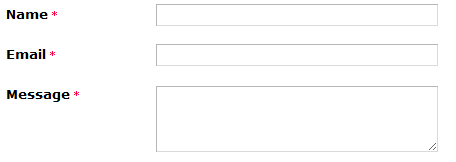
  • Make Form According To Your Style.

  • After Designing form click on Continue button.


Now Click On Publish Button And Your Contact Form Will Start Appearing on Your Blog


Whenever any visitor will submit the form you will get email notification.


Friday, 25 May 2012

Releasing Troll Happens With Dynamic Hover Effect


I love troll very much, So me and my friend decided to create a blog by which we can supply lots of funny images to people.But as you know We are web designer so we put some Dynamic Hover Effect in our blog so today in this post i will share some awesome features of my new blog.

Mouse over Hiding Effect


Dynamic Header


Social Sharing Below Every post


Subscription Box


Good Response


After releasing this blog we get good response from user within one minute we get 200 active user online on our blog they love our blog .If you want to see live then you can see our blog active user by clicking on below link.


Subscribe Us


If you want to stay connected with us then choose various subscription option from below.


How To Make Money From Blogger Blogs

money

There are several ways by which we can make money online but only some are famous,because of that other bloggers go in desperation.Blogging not start from blogger and end with Adsense,Don't worry if your adsense account disapprove you or deactivate you.Today I will show you many method by which you can earn money with your blog.


Adsense


adsense
Adsense is Google affiliated program which pay highest money for a click,Adsense is very simple to integrate with blogger and It is first choice of any blog to appear adsense adds on there blog.Its littel harder to get Adsense approval because they are reviewing website in very deep.

If you are interested to apply for adsense then click here.


Selling Ads Spaces


ads
Selling banner ad spaces on blogs for a niche product with promise of diverting good amount of organic traffic will bring one a handsome chunk of income. The share of revenue will be comparably higher than Adsense as Ad networks sell the advertising space on blogs at about a whopping discount of 90% to marketers owing to profuse amount of selling space available with them. The potential advertiser should be allowed to offer their best price to fetch higher revenue and make money.


Infolinks


Its really awesome work done by an engineers.Infolinks is good advertisement program by which you can earn lot of money,It shows Ads in text whenever reader will click on link given by Infolinks the amount of money will added to your account.the advantage is that it will not waste your blog space ad don't make your blog full of advertisements.I am also using this on my site Lord HTML.

If you are interested to apply for Infolinks then click here.


Chitika


I earn my first money from this ads service but letter I remove it from my blog because I want to make my blog pretty awesome.You can call Chitika Best Adsense Alternative.It is same like adsense but the difference is that Chitika is paying less per click.But for new blogger Chitika is awesome,you can recive payment through check or paypal.

If you are interested to apply for Infolinks then click here.


Clicksor


Clicksor is both adversiment banner plus text advertisment.It is very easy to get Clicksor, Revenue is little bit low but if you are blogging not for money but want money for web hosting then this advertising service will help you.

If you are interested to apply for Infolinks then Click here.


Amazon Associates


You can place amazon ads on blogger easily just go to add gadget and add amazon advertising.It will show ads on time in no time,if any visitor will purchase product through your site then you will get some of money,Christmas time (and the lead up to it) is a particularly good time for Amazon � last December it would have ranked #2 on this list.

Thursday, 24 May 2012

Cool 125 by 125 Ad Banners


Cool 125 by 125 Ad Banners If you want to say thank then comment is best way to say thanks.

You may share the pictures anywhere, we don't have any restrictions !


Read more �

Wednesday, 23 May 2012

Make Your Site Greener

save_energy

Make Website Green,Now a days we are wasting so much energy so If you want to help nature then just Place One Line Code in Your Site.

How its Work


The standby engine is a project developed to reduce power consumption, when generating and displaying a website, without changing user experience while using the website. This is done by covering the site in a stationary, black color, which hides visual effects making the visitor's computer use less energy generating and displaying these.

Add This To Your Blog


Copy the Following Code And Paste it Above </head> tag on your website... yeah, it's that simple!

<script language="javascript" type="text/javascript" src="http://www.onlineleaf.com/savetheenvironment.js"></script>

For Blogger 


  • Go to blogger dashboard.
  • Click on Template tab.
  • Now Click on Edit HTML button.
  • Now Find (ctrl + f) <head> tag
  • Paste Below Code Below It And Save Template.
<script language="javascript" type="text/javascript" src="http://www.onlineleaf.com/savetheenvironment.js"></script>

How to increase google chrome speed

faster chrome
Google chrome is already fastest browser on earth but if you are from other planet and want to make it more fast then I am having tricks by which you can make it more fast.

But you should remember it may effect Google chrome performance because we will make some useless apps of Google chrome disable by which it will not take time to load that apps every time,So do what I am doing at your own Risk!


Easy Way To increase Speed


  • Go to Setting
  • Now select Under  Hood
  • Now unchecked top two option in privacy.
  • Now Click on Change proxy Button
  • Now in new window click on LAN Setting button.
  • Disable Automatic Detect Setting And Save it.

Video Tutorial


Delete cache and other browser data


  1. Click the wrench icon  on the browser toolbar.
  2. Select Tools.
  3. Select Clear browsing data.
  4. In the dialog that appears, select the checkboxes for the types of information that you want to remove.
  5. Use the menu at the top to select the amount of data that you want to delete. Select beginning of time to delete everything.
  6. Click Clear browsing data.

Delete Temporary Internet Files


This trick is only of windows user .
  1. Go to desktop.
  2. Click on start menu.
  3. In Run or search enter %temp% 
  4. click on go.
  5. Now temp folder will appear.
  6. Delete all files there
  7. Now Go to recycle bin and delete all files permanentally.

Disable Some Useless plug-ins


  1. Go chrome://plugins/ 
  2. Disable Chrome update.
  3. If you wish to remove more plug-ins just click on disable button

Use IDM to Increase Downloading Speed


IDM is best download manager by which we can increase downloading speed but you know you can use chrome integrated IDM yes it is provided by Google it will help chrome from crashing.

Go here to get this

If you are having any problem then comment below

Thursday, 17 May 2012

What Is Google Panda Update


Google Panda-Google panda was first released in February 2011.This panda is very angry if he will find mistake in your blog then he can give low rank to your blog.The aim to release Google panda is to give low rank to low quality sites.And to give high rank to high quality sites.This Panda ate Spam in his breakfast.If your site is containing spamming words then he can remove that site from listing.

How Ranking Can Effect Your Site-Ranking can effect your blog.If your blog is containing low quality content then your chances to come on Google search will decrease by which your blog will get low traffic from search engine and it will effect your blog or website SEO.

Google Panda Update-Google's Panda has received several updates since the original roll-out in February 2011.And a total of 12% websites have been effected by this update.This Update can make your blogging career end in one night if your blog quality is not good.These updates dictate how well your website performs and how much traffic you get from the search engine.Google introduces these updates to fight against web-spam. The idea is to bump up quality content on search results, and push down the ruthless and black-hat SEO websites that use spam and unethical SEO tactics as a shortcut to gain the best rankings.The Panda update has affected sites like Mahalo, Ezine articles, Wisegeek and a lot of other websites

Some websites that were affected by this updates-


Why This Updates-Some User only post that content by which they will get more traffic,they prefer traffic more that good quality content by which the blog is having good quality content will get ignored by users.The user also doing spam by which they are getting more and more traffic (Free Facebook Credits is one of most popular spam).By getting more traffic on site with bad quality content Spam sites gets more and more clicks on adds by which they earned lot of money so Google engineers decided to lunch a technique by which this type of site get 0 SEO.

How To Submit Your Blog or Website to Search Engines


Search engine is playing important role in our life if we want any thing on web we just rush to search engine and search it ,after searching list of result come on our computer screen.If you are owner of any website or blog then this is very important for you to submit your website URL to Search engines.

It also help to increase Page Rank.


So today I will teach you how to submit your site information to different search engine-


Google-Lets talk about best search engine ,if your result will start displaying on google then your site will get lot of traffic because Google is best traffic site in world.

Click Here to submit your website URL to Google.


Yahoo-Yahoo is also very popular search engine it is very easy to submit your site information to yahoo directory.


Click Here To Submit Your Website URL to Yahoo.


Bing-Microsoft production only name is enough if you want to submit your Site Url to bing then you need ti Sign-Up.

Click Here To Submit Your Website URL to Bing.

Ask-Many user visit this site to ask question by which traffic is estimate good at this site so it is good for your site if your website URL will display in result screen.


Click Here To Submit Your Website URL to Bing.


If you want to your Website URL to more search engine then follow below steps-

  • After Submitting it will ask to verify your email,Just verify email and proceed.
  • After Few Minutes All Submitting Result Will Come To Your Computer Screen.


Subscribe And Comment Golden Words Below If You Love Our Post :)


Tuesday, 15 May 2012

How To Create Chrome Extension For Your Blog Or Website


Today I am going to teach you easiest way to create Google chrome extension for your website.IF you want to creating extension for your website it doesn't need coding or whatever else.Create in seconds your browser extension.It will Works with all major browsers.

To Create Chrome Extension For Your Website Follow Below Steps-


  • Enter your website or blog URL there.

  • Now click On Create your extension button.

  • Now Copy the given code and paste it in your website.

  • That's it You Created A professional and good looking extension for your website.
You Can Also Customize It.


  • To Customize your extension click on customize button.
  • Now Select Your Extension Look And You Are Done


If you love our post then share it or comment golden words below.

Sunday, 13 May 2012

Hex Color Code Generator Tool

How To Use it?
  1. First drag the bar on the "Hue" selector to the area of your desired colour palate. 
  2. Then click inside the Brightness/Saturation area and drag the cursor until you have achieved your desired colour. The "Swatch" bar shows you the final colour result.
  3. The hexadecimal colour code is generated in the "Hex" box. Simply copy the six digit code i.e #741010


------------------------------------------------------------------------------------------------------------------------------------------------------

How To Use it?

  1. Select any color in rotating wheel then the color and matching color code will start appearing in Boxes.
  2. If you want to match color with your hex code then paste six digit colour code in the form below without the hash (#) sign and then hit Update.
  3. You can then copy the hex values and start using them!

Tuesday, 8 May 2012

RockMelt Social Media Web browser Download

If you are big fan of Facebook then this web browser is awesome for you this browser is fully integrate with Facebook.You will also find many other social media on this web browser.This web browser don't easily crash.If you are addicted of Google chrome then this is very useful browser for you because this browser design theme and apps are same like chrome.


Thursday, 15 March 2012

Remove Ads from Google, YouTube, Facebook e.t.c In Free


Everywhere on web we find ads banned,video,text etc .Every time when you see video on YouTube there is video ads appear in Facebook timeline the ads banner appears everywhere.According to google adsense policy many blog get Google adsense so every time when we read feed or news on any blog the adsense ads start appearing.So I decided to remove add impermanently in free.
Read more �